Download the Defiant FoE Bot
Defiant ships as an unpacked Chrome / Edge extension. Grab the latest build below,
unzip it, and load it via chrome://extensions → Load unpacked.
On a Chromebook? Extract the ZIP in the Files app before loading it — opening it mounts a read-only archive Chrome cannot install from. ChromeOS steps.

Loading Defiant in your browser
Download & unzip
Save the ZIP from the button above and extract it somewhere stable — moving the folder later means re-loading the extension.
Open extensions
In Chrome or Edge, visit chrome://extensions (or edge://extensions) and turn on Developer mode in the top-right.
Load unpacked
Click Load unpacked and pick the folder you extracted. Defiant is now installed and active on Forge of Empires pages only. Coming from 2.0 or older? Remove the old Defiant first — 3.0 installs alongside it rather than over it, and two copies would both run.
Open the game
Sign in to your Forge of Empires world. The Defiant panel appears alongside the game once the session is live.
/media/archive/ instead of extracting it. That looks like an ordinary
folder, but it is a read-only archive and Chrome cannot load an extension from it —
the attempt fails with Internal error while parsing rules, which looks like a
corrupt download but isn't. Right-click the ZIP, choose Extract all, and
load the extracted folder instead. Keep it under My files or Downloads,
not Google Drive, which is also a mounted filesystem.
Full ChromeOS steps.
Turn on “Allow User Scripts”
This lets Defiant keep itself up to date. You only do it once.
-
Open your extensions page
Go to
chrome://extensions(in Edge:edge://extensions). Make sure Developer mode is on.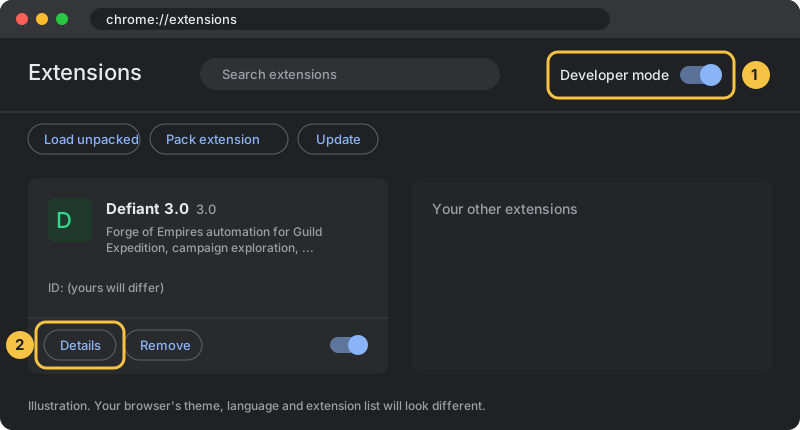
-
Click Details on Defiant
-
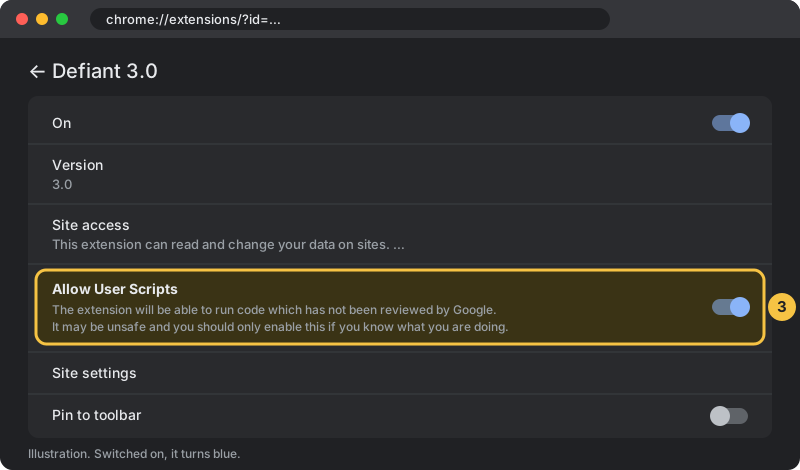
Switch on “Allow User Scripts”
-
Reload the game tab
Defiant's reminder stops appearing.
No “Allow User Scripts” switch? Then Developer mode is enough.
Defiant v3.0
| Version | v3.0 latest |
|---|---|
| Released | 2026-10-31 |
| Size | 228.9 KB |
| Current downloads | 108 |
| All-time downloads | 1,304 |
| What's new | Defiant now keeps itself up to date, so this should be the last download. After loading it, turn on "Allow User Scripts" for Defiant once (see below). Also new: a minimum profit % for the Great Building Sniper, Daily Challenge aid and Guild Treasury donations, and a faster Find Friends. Remove the old Defiant before loading this one. |
| Get it | Download v3.0 |
Older versions are intentionally not offered. See the changelog for what's changed.
Defiant is unsigned and distributed only as an unpacked extension.